
CoSpaces Edu (VR Delightex)
Build interactive 3D worlds, museums, and ecosystems in virtual reality using CoBlocks.
Getting Started
Content in Development
The introductory tutorials for CoSpaces Edu (VR Delightex) are currently being prepared. Check back soon for beginner guides!
Build a Museum
Content in Development
The "Build a Museum" project materials are currently being prepared. You'll learn how to curate exhibits and program interactive guides!
Ecosystems Project
Complete the programming objectives for each ecosystem scene. Test your code, then verify your layout using the dropdown solutions.
STEP 1. In the World Scene
Task 1: Boat Animations
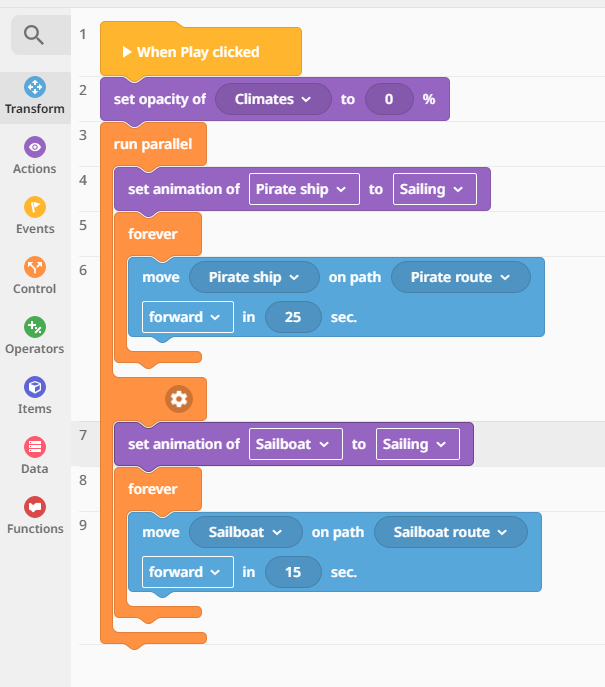
- Animate both boats.
- Make both boats sail on their paths at the exact same time.
▸🔍 Show Solution 10.1
Your blocks should use a run parallel block to move both boat items simultaneously on their tracks:
Task 2: Scene Teleporting Navigation
- Use a
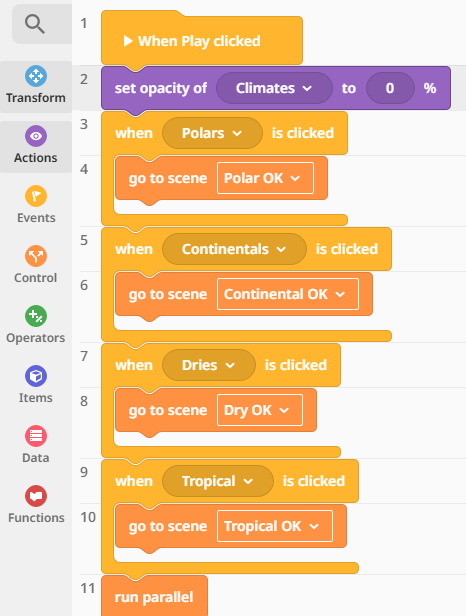
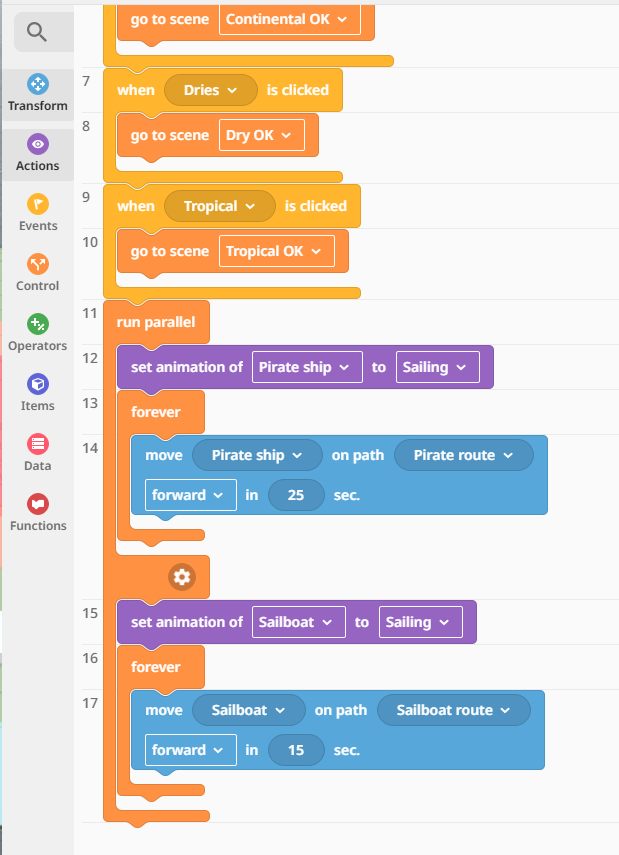
When Clickedevent combined with ago to sceneblock for the navigation texts. - Clicking "Polar" goes to the Polar Scene.
- Clicking "Dry" goes to the Dry Scene.
- Clicking "Continental" goes to the Continental Scene.
- Clicking "Tropical" goes to the Tropical Scene.
▸🔍 Show Solution 10.2a & 10.2b
Ensure each clickable text script directs to the correct ecosystem target workspace environment:
💡 Check Your Understanding
Which block is absolutely required if you want two paths to execute at the exact same moment instead of waiting for one to finish?
Reveal Answer
The run parallel control block handles concurrent execution tracks simultaneously.
STEP 2. Change to the Continental Scene
Task 1: Interactive Horse Interaction
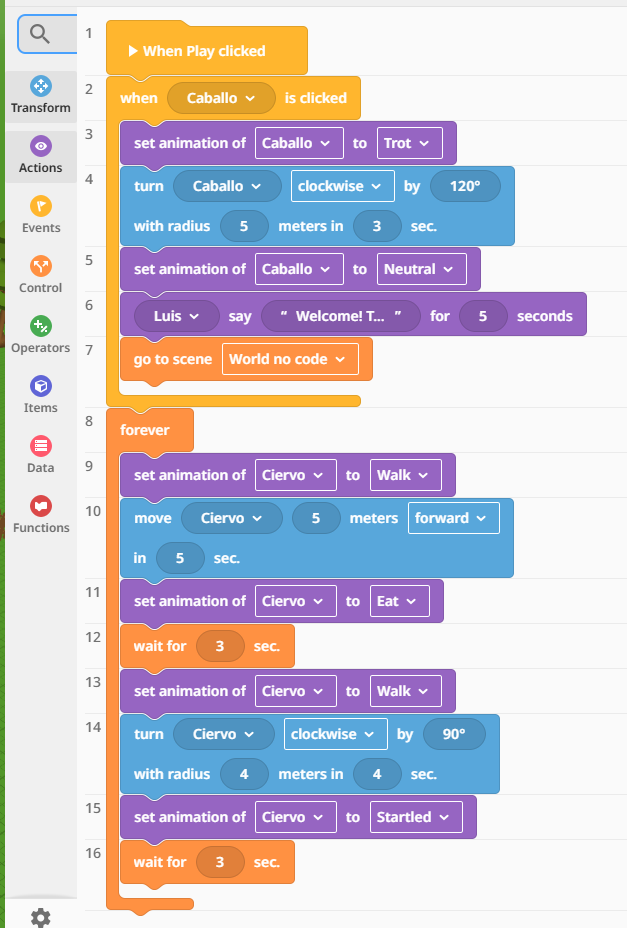
- When the Horse is clicked, switch its animation state to
trot. - Turn the horse clockwise by 120º with a radius of 5 meters over 3 seconds.
- Have Luis say: "Welcome to the Continental climate..." followed by your custom ecosystem description text definition.
- Use
go to sceneto redirect the sequence back to the world scene.
Task 2: Continuous Deer Scripting Loop
- Make the deer loop its movement
forever: - Set animation to
walk, move 5 meters forward in 5 seconds, then wait 3 seconds. - Set animation to
eat, turn clockwise by 90º with a radius of 4 meters over 4 seconds. - Set animation to
startled, then wait 3 seconds.
▸🔍 Show Solution 10.3
Review the loop nesting and event triggers configuration structure below:
💡 Check Your Understanding
What happens if you forget to add a "wait" block after assigning a temporary animation state like "startled" inside a continuous loop?
Reveal Answer
The system immediately skips to the next block logic, and the animation might change instantly before the student can see it play out.
STEP 3. Change to the Polar Scene
Task 1: Concurrent Action Sequencing
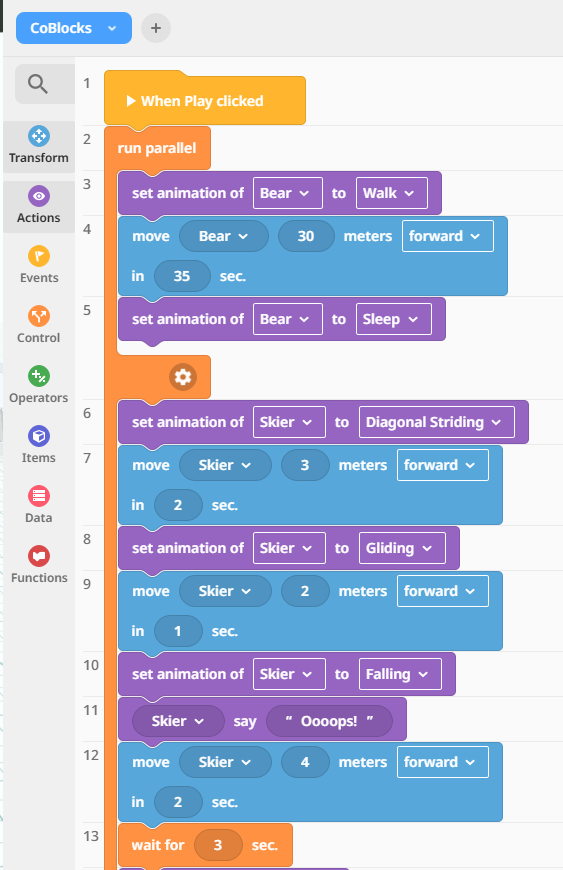
- Program the Bear and the Skier to run parallel.
- Bear Configuration: Animation to
walk→ move 30 meters forward in 30 seconds → animation tosleep.
▸🔍 Show Solution 10.4a
Check your tracking track syntax setup for the polar bear path routine profile:
Task 2: Complex Skier Movement Timeline
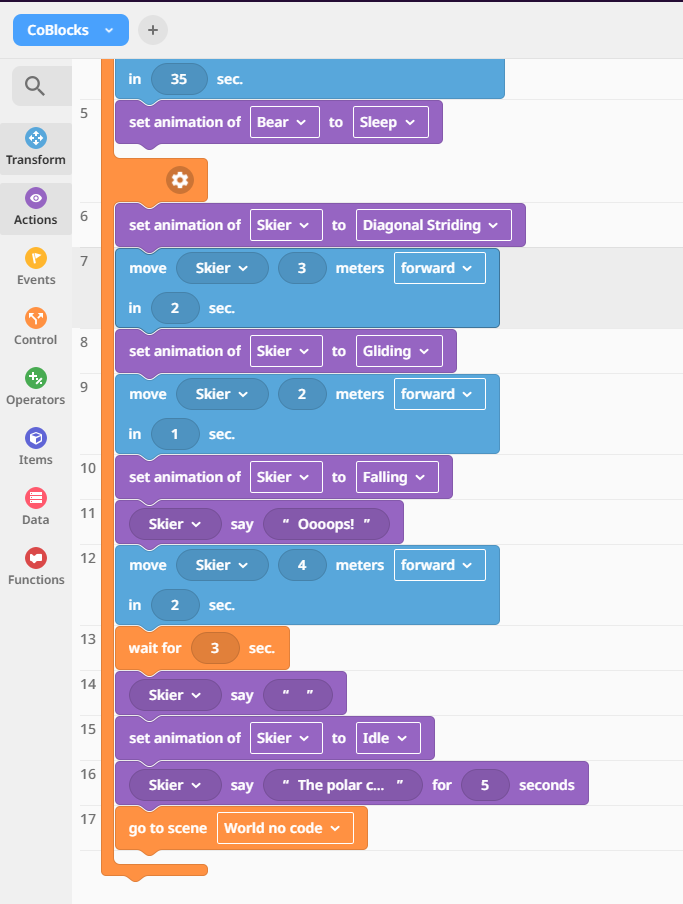
- Skier Sequence:
- Animation to
diagonal sliding→ Move 3 meters forward in 2 seconds. - Animation to
gliding→ Move 2 meters forward in 1 second. - Animation to
falling→ Skier says "Oops!" → Move 4 meters forward in 2 seconds. - Wait interval execution → Skier says a blank message string " " to clear the bubble text area.
- Animation to
idle→ Skier says: "The polar climate is..." (Add your information definition text here). - Return to the hub using
go to scene - world.
- Animation to
▸🔍 Show Solution 10.4b
Double-check the timing logic parameters for each segment shift in your project setup panel view:
STEP 4. Change to the Dry Scene
Task 1: Click Trigger Behavior
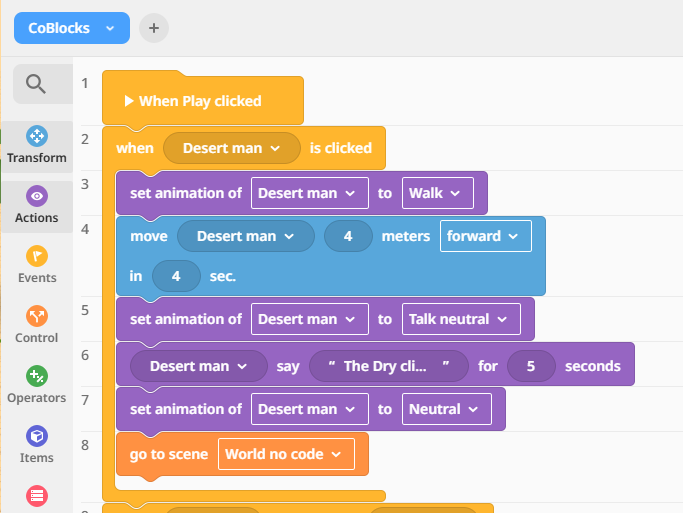
- When the desert man is clicked → Animation to
walk→ Move 4 meters forward in 4 seconds. - Change animation to
talk neutral→ Say: "The Dry climate is..." (Add your eco-facts detail notes here). - Set animation back to
neutral→ Triggergo to scene - world.
Task 2: Collision Detection Scripting
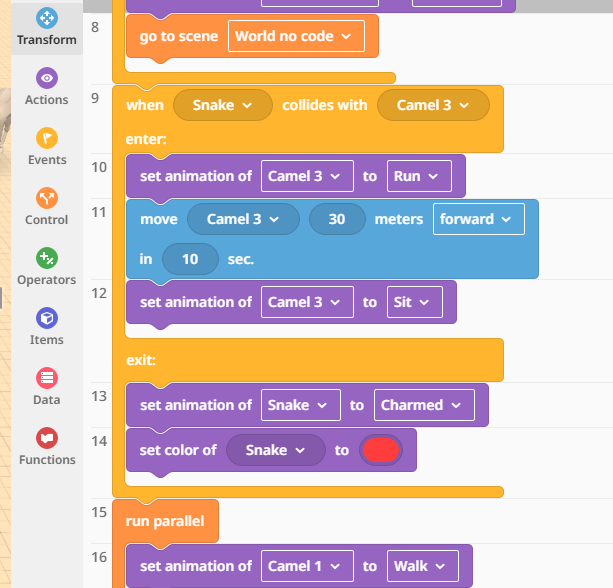
- When the snake collides with the camel:
- Enter block: Camel animation to
run→ Move 30 meters forward in 10 seconds → Animation tosit. - Exit block: Animation of the snake changes to
charmed→ Set color item property of the snake to red.
▸🔍 Show Solution 10.5a
Verify collision block placement conditions format properties mapping here:
Task 3: Parallel Running Action Logic
- Camel Segment: Animation to
walk→ Move 12 meters forward in 12 seconds → Turn counterclockwise by 120º with a radius of 4 meters over 4 seconds → Animation toeat. - Snake Segment: Animation to
slither→ Move 15 meters forward in 10 seconds → Turn clockwise by 180º with a radius of 3 meters over 5 seconds.
▸🔍 Show Solution 10.5b
Examine the alignment tracking within this layout flow design matrix panel:
STEP 5. Change to the Tropical Scene
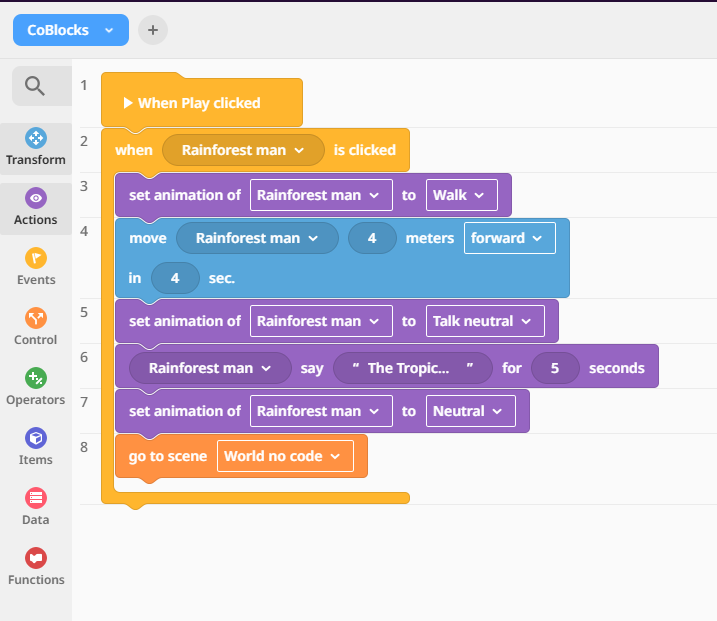
Task 1: Tropical Interaction Routine
- When Rainforest man is clicked → Animation to
walk→ Move 4 meters forward in 4 seconds. - Change animation state to
talk neutral→ Say: "The Tropical climate is..." (Incorporate your custom climate facts). - Revert animation to
neutral→ Return home usinggo to scene - world.
▸🔍 Show Solution 10.6
Observe the target structure pattern setup configuration map view details:
🚀 Bonus Challenge: Creative Sandbox
Add any extra creative logic paths you want to test! Create interactions, color modifications, or terrain effects to bring your ecosystems alive.